Why does exhibitor lead retrieval fail so often at trade shows, and how can badge scanning fix it?
Exhibitors pay for booths to collect leads, then go home with a pile of business cards and a spreadsheet nobody trusts. Most of the failure is process, and badge scanning can fix the process.
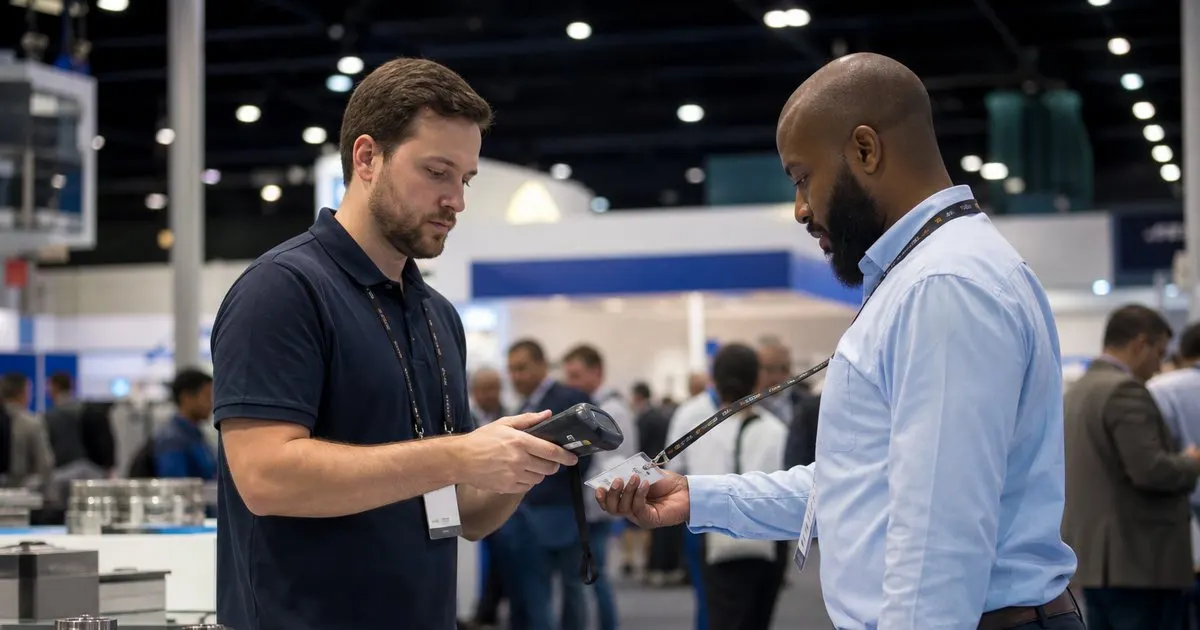
The usual ways lead retrieval breaks
The first failure is capture. Booth staff get busy, a conversation ends, and the badge never gets scanned, or the visitor drops a business card that ends up in a jacket pocket. The second is data quality: scans that produce a name and company but no email because the badge only carried partial data, or hand-typed entries with typos that bounce when the follow-up email is sent. The third is context: a week later, the sales team has two hundred names and no idea which ones asked a serious question and which ones wanted the free pen. Related: How can event organizers speed up the check-in line during the busy first hour of a conference?
Underneath all three is a tooling problem. Rented scanners that only work with one show's badge format, apps that need an account per staff member and never get installed, and exports that arrive days after the show as a spreadsheet with inconsistent columns. When the tool is awkward, staff stop using it by the second afternoon, and the organizer hears afterward that the show produced no leads, even though the aisles were full.
Keep reading: How can event organizers speed up the check-in line during the busy first hour of a conference?, What are the benefits of printing event badges on site instead of pre printing them all in advance?, How do organizers track session capacity so a popular conference talk does not become overcrowded?. See how BadgeCheckr helps you event attendee badge check-in and scanning.
What a good scan-based process looks like
Every booth staff member has the scanning app on their own phone, logged into the exhibitor's account, before the show opens. Scanning a badge takes a second and immediately shows the visitor's name and company from the organizer's database, with contact fields released according to the visitor's consent. Right after the scan, the app prompts for two or three qualifying taps: interest level, product line, and a follow-up action. A free-text note field is available for the one detail that matters, such as the visitor mentioning a budget or a timeline.
The scan records the timestamp and the staff member who captured it, which turns the lead list into a record of who talked to whom and when. At the end of each day, the exhibitor's lead list is available to export or to sync with their sales system, without waiting for the organizer to compile anything. The organizer, in turn, can see aggregate scan activity by booth, which is useful for proving the show's value to exhibitors when it is time to sell next year's floor.
Getting exhibitors to actually use it
Adoption is the hard part. Send exhibitors the setup instructions two weeks out, not buried in the exhibitor kit they will not read, and offer a short live walkthrough the afternoon before the show opens, at the booth if possible. Preload each exhibitor's account with their staff list so nobody has to invite colleagues from the show floor. Keep the qualifying questions to a handful, since a ten-question form guarantees staff will skip it.
Make the value obvious in the first hour. When an exhibitor sees a clean lead list building in real time on their phone, with names and companies they recognize from the conversation they just had, the business cards stay in the drawer. Have a floating staff member from the organizer's team walk the aisles the first morning to solve login problems on the spot. One person doing this for three hours prevents most of the complaints that would otherwise arrive by email a week later. Related: How should you prepare and train a check-in team before the doors open on event morning?
Respecting the attendee in the process
Lead retrieval only works if attendees are willing to be scanned, and they are more willing when they understand what is shared. Say at registration which fields an exhibitor receives when a badge is scanned, and give attendees a choice about it. Visitors who know that a scan shares a work email and nothing else will hold out their badge without hesitation. Visitors who suspect their phone number is about to be sold will hide the badge behind a tote bag. Related: How should an event handle walk-up attendees who never registered before arriving at the door?
Enforce the consent in software rather than in policy documents. If a visitor opted out of sharing, the exhibitor's scan should record the visit but show no contact fields, with a note that the visitor can be reached through the event's own messaging feature. Exhibitors grumble at first, then realize that the leads they do get are people who wanted to hear from them, which is the only kind of lead worth following up. Related: What are the benefits of printing event badges on site instead of pre printing them all in advance?
- Lead retrieval fails on capture, data quality, and missing context, and most of it traces back to awkward tools.
- A good scan flow shows the visitor's details instantly, prompts for two or three qualifying taps, and stamps the time and staff member.
- Adoption depends on preloaded staff accounts, a short live walkthrough, and someone from the organizer walking the aisles on day one.
- Enforce attendee consent in the scanning software so exhibitors only receive fields the visitor agreed to share.

Julien Jimenez
Julien Jimenez is an independent software builder based in Paris. He designs, ships, and operates focused SaaS products for small businesses and independent professionals. Read the full author page.
A check-in line that moves
Event attendee badge check-in and scanning. BadgeCheckr is built to help you put this into practice.
Set up check-inMore from the BadgeCheckr blog

Get the BadgeCheckr playbook
Practical guides on event check-in, straight to your inbox as we publish them. No spam, unsubscribe any time.